News
September 22, 2026 — Wiki: Every Item and Every Monster
- Item catalog. All 327 base items with icon, slot, tier and the areas they drop in — searchable, filterable and sortable. Browse it.
- Monster catalog. All 909 monsters with icon, tier and the difficulty range they spawn in. Browse it.
- Both tables read the game’s own data, so they stay correct the moment new items or monsters ship.
- Correction — attunement. Elemental Damage Boost can be attuned; the wiki was missing it. But physical is never a source and never a target, so a physical Elemental Damage Boost is permanent — and a drop is the only way to get one (0.83%).
- Correction — monster tiers. The tier table was off by one: difficulty 1–10 is tier 1, and tier 6 ends at difficulty 500, not 999.
September 13, 2026 — Season 2 is Live
- Season 2 has started. The Temporal Realm is open, everyone begins at level 1 on a fresh leaderboard, and it runs until Friday Nov 13, 20:00 CET.
- 2x game speed and 1000 fights per run instead of 500. No XP bonus this season; speed replaces it. The Eternal Realm is unchanged.
- Hardcore: nightmare deaths are permanent again, solo and co-op. The testing phase is over, and the yellow notice is gone with it. Softcore is unaffected — nothing below applies to you.
- Hardcore: be careful accepting an invite. A co-op boss is rolled from the host’s scroll, not from your level, and the Nightmare strikes each hero first at full force. Join someone much stronger and you can be one-hit before you swing once. The request window shows element, DEF and ATK — read them first. Declining costs nothing.
- Dodgy Chicken: Dodge scales with your final rank — 10% at rank 1 down to 1% at rank 100 and below. Everyone who finishes on a board gets one, account-wide on every character. Details.
September 3, 2026 — Notifications When Your Run Ends
- Your hero keeps fighting after you close the app — that was always true, the game just never told you when it was over. Now it does: run complete, or you have fallen, with your level and fight count. Only when you are actually away; if the summary is already on your screen, nothing buzzes.
- We ask for permission once, at the start of a run, and explain what it is for first. Saying “not now” costs nothing — it never touches the browser or system setting, so we can ask again later.
- Works in the browser right away. On Android it arrives with the next app update from the Play Store, because it needs a part of the app the store has to deliver.
- The “BG” background button is gone. Your run always continued on our servers without it, so it was never doing the work it looked like it was doing — and the notification it kept on screen never actually said what happened. The new notification does that job properly, and on the web too.
- A calmer screen while we deploy an update. The game now says “Server is updating. Please wait” and reconnects by itself. It used to show a technical error and ask you to screenshot it and email us — nothing was ever wrong, the server was just restarting.
August 29, 2026 — Co-op Nightmares, Travel Provisions & Scroll of Insight
- Nightmare scrolls are no longer a solo affair. Reading one asks whether to go in alone or call for help — and asking spends nothing. The scroll stays in your backpack until someone actually joins, so you can change your mind and keep it. Full details in the wiki.
- Everyone online on your realm is listed, twenty to a page, with their level. Whoever you pick gets a badge at the top of their screen wherever they are — including mid-run. Several people can ask the same player, and the badge pages through them so they get to choose. Requests last 2 minutes and you can ask again.
- You can wander town while you wait — merchant, anvil, well — and a small marker follows you. The first player to accept joins you, a 5 second countdown runs, and the fight opens with both heroes side by side. A [ Gear ] button switches the equipment panel between the two of you.
- Each round the Nightmare strikes first, hitting each of you separately at full force against your own armour, dodge and block — then the host swings, then the guest. Two heroes hit twice as hard, but you take a round of damage before you land one.
- Win and every item it drops is split at random between you — the nightmare crystal included. The summary shows which item went to whom. Both heroes earn the full experience and both roll for the boss soul and for taming.
- Retreat and you still keep a share, scaled by how far the fight had got. Leave with the Nightmare on half health and each item is a 25% chance for you and 75% for whoever stays; leaving at the start is worth nothing, leaving near the end costs almost nothing. A helper who answers mid-run has their own run retreated first, keeping all its loot exactly as a normal retreat would.
- A helper's share is never forced into a full backpack. It waits on a chest icon there with a counter, one click per item — so a full backpack delays a reward instead of destroying it.
- Scrolls now show the Nightmare's element and its DEF and ATK multipliers, both in your backpack and in the window where you decide whether to help.
- While co-op is in testing, hardcore deaths are switched off for nightmares — solo ones included. A hardcore character can lose a nightmare without being lost. Dying on a normal run is unchanged and still permanent. This goes back on when the testing period ends, and we will say so.
- New consumable: Travel Provisions. Activate it in town and your next run lasts longer before the fight cap ends it — +200 fights at Common, rising to +600 at Ancient (300 / 400 / 500 for Rare / Exquisite / Epic). It adds on top of whatever cap the realm already has.
- New consumable: Scroll of Insight. Every kill on your next run grants more experience — +20% at Common, rising to +40% at Ancient (25 / 30 / 35 for Rare / Exquisite / Epic). Both work like Tamer Bait: activate in town before a run, consumed when it begins, shown in your buff bar while queued. The merchant stocks both at Common; higher rarities come from drops.
- Fixes: shield-bash life leech was missing from brawl replays (the healing always happened, it just was not drawn), and the Loot Filter buff icon disappeared from the buff bar after closing and reopening the game mid-run (the filter never stopped working, and no scroll was wasted).
August 22, 2026 — Season 2 Starts September 13
- Season 2 starts Sunday Sep 13, 20:00 CEST and runs until Friday Nov 13, 20:00 CET. The Temporal Realm reopens — everyone starts at level 1 on a fresh leaderboard.
- New: 2x Game Speed. Fight rounds tick twice as fast in the Temporal Realm, so you get through twice as many fights in the same time.
- Runs are twice as long: the fight cap per run goes from 500 to 1000 in the Temporal Realm. Combined with 2x speed a full run still takes about 3 hours — you just get twice the loot out of it.
- No XP bonus this season. Season 1 had double XP; Season 2 trades it for raw speed.
- The Eternal Realm is unchanged — normal speed, 500 fights per run.
- Rewards are locked in: the Season 2 Champion skin (turquoise plate, for rank 1 on each of the four boards), the Season 2 Participant skin (turquoise cloak, for everyone who plays), and the Dodgy Chicken — the Lucky Chicken's turquoise cousin, granting Dodge instead of Magic Find, from 10% at rank 1 down to 1% at rank 100. Full details.
- Also new since Season 1, and live in both realms right now: Co-op Nightmares — ask other players to help with a nightmare scroll — plus Travel Provisions (longer runs) and the Scroll of Insight (more XP per kill). These are not season features: they work in the Eternal Realm too.
- As in Season 1, Temporal characters merge into the Eternal Realm when the season ends, and account-wide rewards are granted based on your best leaderboard rank.
July 31, 2026 — Season 1 Has Ended
- Season 1 is over and the Temporal Realm is now closed. Thank you to everyone who competed!
- All Temporal characters have been merged into the Eternal Realm — they keep their level, gear and stash exactly as they were.
- Rewards have been granted account-wide based on your best leaderboard rank across all four boards: the Lucky Chicken pet (its Magic Find scales with your rank — rank 1 gets the strongest version), the Season 1 Champion skin for first place, and the Season 1 Participant skin for everyone who played a season character.
- The final Season 1 leaderboards are archived on the website and stay viewable forever.
- Season 2 is coming. Modifiers, rewards and the launch date will be announced soon.
July 5, 2026 — Hardcore Stalemate Fix
- Fix: A Hardcore character could die from a stalemate — when a fight reached the round cap with your hero still alive. That was never intended: a timeout is a loss, not a death.
- Now a stalemate only ends the run as a loss. Your Hardcore character survives and returns to town. Only actually dropping to 0 HP is fatal in Hardcore. This applies to normal runs and Nightmare fights.
- Reminder on the round cap: 100 rounds in PvE (runs and Nightmares) / 50 rounds in PvP. If you keep hitting it, your build is likely too defensive — add damage so fights actually end.
- Hardcore characters wrongly killed by a stalemate have been revived. Sorry for the scare!
June 14, 2026 — Bug Fixes & QoL
- QoL: Reforge now guarantees all 3 offered choices have different attribute types.
- Fix: After starting a run where the enemy sprite was briefly missing and the HP bar flickered. The client now self-heals from any missed enemy data by recovering from embedded fight-round fields.
- Fix: Android — watching a Boost video did not activate the boost; the button stayed visible even after the ad finished. The reward was being misread as a failure.
- Fix: Travel Backpack sometimes lost the stars on your starred items, especially after switching browser tabs away and back during a run. Stars are now tracked per item and stay put.
- Fix: Tamer Bait buff icon disappeared from the buff bar after restarting the game or switching devices mid-run.
- Fix: Normal Tamer Bait tooltip showed 30% tame chance instead of the correct 20%.
- Fix: Tamer Bait showed “Equipped (empty)” in the merchant preview.
- Fix: Tamer Bait appeared in the smithing item list.
- Fix: Tamer Bait of the same rarity no longer piles up as separate stacks — it now auto-stacks with existing bait on pickup and when moving to/from the stash, like Picky Scrolls.
June 10, 2026 — Pet System is here! Catch them NOW! & QoL
Pet System
- New: Pets! Every character starts with a Loyal Dog companion (1 HP Regen per round).
- Pets have a chance to attack each round — damage goes through the full combat pipeline (armor, elemental weakness/resistance).
- Select your pet in the Town Well (new Pets tab next to Character Skins).
- Your pet is visible in town, during runs, nightmares, duels, and when other players inspect you.
- Season 1 reward: top players on each leaderboard will receive a Lucky Chicken pet with Magic Find scaling based on final rank.
Pet Taming
- New: Tame bosses! 385 catchable pets across all 8 areas — animals, beasts, and dragons.
- Buy Tamer Bait from the merchant and activate it before a run. Tameable bosses show a (Tamable) tag — catch them on a successful soul capture.
- Caught pets are character-bound. Re-catching at a higher difficulty upgrades the pet.
- Defensive pets grant flat elemental reduction, offensive pets (dragons, phoenix, jellyfish, and other mythical creatures) add flat elemental damage. Swarming creatures (ants, spiders, snakes, etc.) are attack-only powerhouses.
- Full details: Pets & Taming Wiki
QoL
- Storage Chests no longer drop once all 30 stash slots are unlocked.
- Scrollable areas (fight log, playlist, results screen) now have up/down arrow buttons for easier scrolling on touch devices.
- Fix: Magic find was not properly applied to loot rolls.
- Fix: Android — screen could freeze permanently when all ad creatives failed to load, requiring a force-close. Thanks ShinGetsu for reporting.
June 3, 2026 — Hotfix
- Fix: Nightmare fights caused extreme GPU usage on mobile devices (100% GPU on high-end phones). Caused by the nightmare vignette overlay rendering at millions of pixels instead of the intended 1280×720.
- No forced update — if you are affected, manually update from the Play Store.
June 1, 2026 — Season 1 is Live!
- The Temporal Realm is open! Fresh leaderboards, double XP, everyone starts at level 1.
- Race to the top for the Season 1 Champion skin. All participants earn the Season 1 Participant skin.
- Spoiler: as additional reward, a unique Season 1 pet for the upcoming Pet system — with attributes scaling based on your final rank.
- At the end of the season, your temporal character merges into the Eternal Realm with everything you earned.
May 26, 2026 — Season 1 Prep: Fixes and Balancing
Hotfixes
- Fix: items could appear twice in inventory after a run on Steam — caused by a server-side race where two cleanup paths both persisted the same loot. Thanks propandaplays for reporting.
- Fix: tempering a dagger's flat elemental damage attribute rolled in a much lower range than the original. Now uses the same range as when the dagger was generated or reforged (item level to 2× item level).
- Fix: rarely, using a Picky Scroll and immediately starting a run consumed the scroll without applying the filter — normal/common items kept dropping. Thanks Astreavan, categenov, and others for reporting.
- Perf: lightened the Nightmare fight visual effects (smaller glow, fewer particles) to reduce CPU usage during the fight on PC. Thanks Ok-Championship444 for reporting.
- Fix: rare race after starting a run where the enemy sprite was briefly missing and the HP bar visibly flickered 100→0→100→0 on each hit. Caused by the two server backends occasionally both emitting fight events for the same player after a network hiccup. Fight events now carry a run ID so the client ignores leftovers from a stale loop.
- Fix: crash on launch on Android 9–10 devices (Samsung Galaxy Tab A, Redmi, Evertek, and others). Caused by a display-cutout setting that only exists on Android 12+.
Behind the Scenes
- More balance values now sync from the server to the client, so future tweaks land without needing a client update.
Balance — Resistance Softcap (Season 1 Prep)
- Reintroduced a meaningful softcap on per-element resistance. The existing guardrails —
- Verdant Woods drops capped at tier 1-7 (vs 3-10 in tougher areas),
- the 99% hard cap on effective resistance, and
- the auto-generated weakness to other elements when stacking physical resistance
- How the new softcap works: below 90% resistance is unchanged (1:1, every raw point = one effective point). Above 90% each percent costs progressively more raw reduction:
Effective % Raw reduction needed 91% 92 92% 95 93% 99 94% 104 95% 110 96% 117 97% 125 98% 134 99% 144
Balance — Attribute Tuning
- Reduction min raised from 1 to 2.
- Reflect range changed from 1–5% to 2–6%.
- Dodge range changed from 1–5% to 2–6%.
- Crit Chance range shifted from 2–8% to 2–6%.
- Heal over Time multiplier range changed from 0.1–0.5 to 0.2–0.6.
- Magic Find min raised from 1 to 2.
- Life Leech min raised from 1 to 2.
- Weakness factor range raised from 0.5–1.1 to 0.6–1.2.
Wiki
- Added a smithing affordability ceiling table to the economy wiki — for each rarity and operation, the maximum
item_level / player_levelratio at which the cost still fits in a full bank. The tightest case is enhancing/upgrading an Ancient item, affordable up to 1.33× your player level. See Economy & Smithing → Smithing Summary. Thanks space_turtle for prompting the write-up.
May 20, 2026 — Multi-Server Rework & QoL Tweaks
- Server state is now shared across all backends. Logging in from a second device (different IP, possibly routed to a different server) no longer auto-retreats your in-progress run — the run keeps going and the new device picks up where the old one left off.
- Fights resume much faster after a server hiccup: worst case ~13s (was ~45s).
- Behind the scenes: lots of new integration tests covering the cross-server paths that would have been hard to spot in production.
- Boost button now appears starting at level 2 (was level 5) — grab that XP & backpack bonus much earlier.
- New characters now start with 1 stash slot already unlocked, so the Stash button is available from your very first town visit.
- Picky Scroll merchant prices reduced: common now costs 50% of your gold cap (was 100%); rare now costs 80% gold + 80% dust (was 100% of each).
- Heads-up: if you notice worse connection stability or anything weird after this update, please email [email protected] so I can look into it.
May 14, 2026 — Steam Achievements
- Steam achievements now fire on the run summary screen instead of mid-run, so headless (idle) runs no longer miss achievements
- New: Sync Achievements button in Options (Steam only) — pushes all earned achievements to Steam, useful if you played on web first
- Fix: dead hardcore characters no longer block account linking (Steam ↔ Google)
- Fix: improved connection stability on Android for players far from EU (no forced update — manually update from Play Store if you have connection issues)
May 13, 2026 — Server Stability & Performance
- Simplified server architecture to eliminate a class of connection routing issues that could cause stuck runs or lost fight state
- Improved connection stability for players far from the server (faster disconnect detection, faster reconnection)
- Performance: Hall of Fame and PvP rankings load significantly faster
- Performance: reduced server load during town operations (inventory, storage, merchant)
May 12, 2026 — Hotfix
- Fix: rare server error could permanently lock a run, preventing new runs from starting
- Fix: rare server error on Google login when clicking the button twice quickly
May 12, 2026 — Steam Launch
Epic Idle Quest 2 is now available on Steam!
A huge thank you to everyone who has been playing since the early days — you endured the bugs, reported them, and helped shape the game into what it is today. We hope you'll stick around for Season 1 on June 1st and beyond.
May 12, 2026 — Nightmare Fight Stability
- Enhanced retry logic for nightmare socket connections
- Extended in-game connection status logging
- Fix: smithing crystal level requirement now shows the actual minimum level needed instead of the level of the crystal in your inventory
May 11, 2026 — Seasons & Steam Preparation
Server — Seasons (June 1 launch)
- Seasons system: temporal realm with double XP, frozen leaderboards, and character merge scripts
- Season rewards: exclusive skins (and more!) for top ranks and all participants
- Freeze + merge workflow with graceful shutdown, leaderboard snapshots, and rank persistence
Client — Steam (May 12) & Seasons
- Login screen: season/realm info panel showing season name, dates, and bonuses
- Hall of Fame now filtered by realm (eternal shows eternal characters, temporal shows temporal)
- Season ranks displayed in lifetime stats tab after season merge
- Asset cache busting via version parameter — no more stale sprites after updates
- Season XP buff icon in buff bar
- Reward skins named: Season 1 Champion / Season 1 Participant
- Patch notes now fetched from server — no more client redeploy for news updates
Website
- Leaderboard inspect enriched: now shows armor, damage, skills, and lifetime stats for all views (eternal, season, temporal)
- Season leaderboard tabs with full equipment detail and attribute breakdown
May 10, 2026 — Nightmare Fight Stability
- Server maintenance now shows a friendly message instead of the bug report popup
- Fix: nightmare fights now properly resume after reconnecting (F5)
- Fix: nightmare stuck when load balancer routed login to a different server (e.g. different IP/device)
- Nightmare fight aborts if client fails to establish socket connection (prevents ghost fights that lock you out)
May 9, 2026 — Bugfixes
- Fix: concurrent requests could bypass resource checks — e.g. buying the same merchant item twice by sending rapid requests. All resource-spending actions are now serialized per player (thanks Lauri!)
- Fix: regeneration heal-over-time could produce fractional HP, causing a server error when resuming a run (thanks Space Turtle!)
May 6, 2026 — Dagger Rebalance & Bugfix
Daggers
- Flat Elemental Damage rolls more often on daggers: 25% → 35% of attribute slots (split 20% area-element / 15% random)
- Elemental Damage (%) rolls less often on daggers: 25% → 15% of attribute slots (split 10% area-element / 5% random)
- Flat Elemental Damage roll range tightened:
item_level × 0.2–2.0→item_level × 1.0–2.0— floor raised, ceiling unchanged. Lowest rolls are now 5× better; expected value up - Utility attributes (Magic Find, Life Leech, Crit, Life on Hit) unchanged at 50% combined
Stats Panel
- Fix: physical damage bonus % from item attributes now displays in the stats panel (previously the row always read
100%regardless of bonuses) — visual only, the bonus has always been applied to damage
May 3, 2026 — Nightmare Crystals
Nightmare Crystals
- Nightmare boss wins now drop a Nightmare Crystal — a new consumable that lets you push items beyond normal smithing limits
- Three crystal types: Reforge Crystal, Temper Crystal, and Attune Crystal
- Each crystal bypasses its respective smithing cap (reforge past 2/2, temper past 3/3, re-attune an already-attuned item)
- Collect all 3 crystal types to unlock an additional Upgrade on an already-upgraded item
- Crystal level equals the nightmare’s difficulty — must be ≥ the target item’s level
- Lowest qualifying crystal consumed first when multiple are available
Smithing
- Anvil now loads all item previews at once — switching between items is instant
Nightmare Safety
- Nightmare fights now auto-retreat if you disconnect — protects hardcore characters from dying to connection issues
April 30, 2026 — Drop Mode, Android Stability & Website Overhaul
Travel Backpack
- New “Drop: Unselected” mode — star the items you want to keep, then drop everything else in one tap
- Toggle between “Drop: Selected” (mark items to drop) and “Drop: Unselected” (mark items to keep)
- Starred selection is remembered when switching modes
- Selection now persists after dropping and when closing/reopening the backpack
Skin Selection
- Search function added to the character skin picker — type a name to filter skins instantly
Android
- Fix: black screen on launch for some Android devices (font loading could stall indefinitely)
- Fix: deprecated Android API warnings (edge-to-edge display, status bar)
- Both landscape orientations now supported (auto-rotate)
Website
- Redesigned website with dedicated pages: About, Features, Media, FAQ, Download, Getting Started, Combat, and Roadmap
- Full-screen hero banner background across all pages
- Sticky header — header and navbar stay visible while scrolling
- Wiki integrated into the main site with shared navigation
- Hall of Fame now has a Hardcore Only filter toggle
- FAQ with 14 answered questions, linked table of contents, and structured data for search engines
- Navbar restructured into a visitor funnel: discovery → gameplay guides → community
April 26, 2026 — Android One-time Purchase & Hotfix
- Fix: armor was not reducing incoming damage (build diversity regression)
- Android: Supporter Pack one-time purchase now available
April 25, 2026 — Build Diversity Update
Check the Wiki for complete breakdowns of all new mechanics, attribute tables, and smithing tables.
New Attributes
- Elemental Damage Boost — multiplies elemental damage dealt; also amplifies reflect and summon
- Stun — chance to shield bash and stun the enemy after a successful block
- Counter — chance to counter attack after a successful dodge; full normal attack including crit and elemental damage
Shield & Block
- Shield max block chance increased from 10% to 30%
- Bash uses shield armor value instead of weapon damage
- Shield resistance attributes add elemental damage to bash (a fire-resistant shield hits with fire)
- Bash can crit and benefits from Elemental Damage Boost
Reflect Rework
- Reflect now applies before armor and resistance reductions
- Reflected damage is subtracted from the incoming hit (fully thrown back)
- Reflect benefits from Elemental Damage Boost
Damage & Attributes
- Crit now only multiplies physical damage; elemental damage stays at x1 and is boosted by Elemental Damage Boost attributes
- Flat elemental damage greatly boosted but now exclusive to daggers
- Summon boosted — also benefits from Elemental Damage Boost
- Dodge attribute boosted
- Overhauled attribute loot tables and smithing tables
Momentum
- Momentum buff — a successful counterattack activates Momentum, granting one bonus weapon attack per round for 3 rounds (10-round cooldown)
- Bonus attack is a full normal attack (can crit, applies leech, summon, etc.)
- Enemies can dodge or block the bonus attack, but dodging it does not trigger a counter chain
- Stunned combatants skip their bonus attack but the buff timer still ticks down
- Both players and enemies can proc Momentum — fully symmetric in PvE and PvP
Skills & Tavern
- Evasion skill now also grants counterattack chance
- Resilience skill now also grants stun chance
- Tavern inspect now shows complete player stats including skills
UI Fix
- Flying damage numbers and status text (Dodge, Counter, Momentum, etc.) no longer freeze on screen when switching tabs or minimizing during a fight
April 23, 2026 — Resistance Update & One-Time Purchase
Resistance Cap at 99%
- Viable tank build, but has heavy drawbacks
- More attributes coming soon
One-Time Purchase (coming soon)
- Opt out of ads with a single purchase
Anvil UX
- Replaced the item list scrollbar with pagination — much easier to use on mobile
Bug Fix
- Fixed a rare bug where player level could regress after a run — stale run data can no longer overwrite current progress
April 20, 2026 — Brawl Stakes, Stash Rework, Resistance DR & Play Store Flow
Resistance Diminishing Returns
- Elemental resistance % now has a soft cap above 70% per element — each additional resistance point above the threshold is worth less than the one before (same curve style already used for crit, dodge, and block)
- Hard cap at 95% effective: no matter how much raw reduction you stack, the defender still takes at least 5% of incoming damage of that element
- This closes a long-standing exploit: at 200%+ raw reduction (reachable by stacking Physical reduction from Verdant Woods drops or reforging), the damage formula used to go negative — physical hits were literally healing the defender. That's fixed now
- Applies symmetrically to players and enemies — high-difficulty enemies with stacked resistance are also subject to the cap
- The stats panel shows red ▼ arrows next to each element row once you've crossed into the soft cap region, so you can see when additional resistance rolls are worth less
- Flat reduction (absolute damage absorbed per hit) is unchanged — it's already naturally floored at 0 per hit and doesn't have the same exploit
Brawls Have Stakes
- Brawl win rewards are now stolen from the loser's gold (not minted out of thin air). PvP is zero-sum for gold: the attacker gains exactly what the defender loses
- Defenders can be drained down to 0 gold, but never pushed into debt. If the winner is at their gold cap, no gold moves — the ELO swing still happens, but the loser's wallet is untouched
- Successful defense now pays: if an attacker brawls you and loses, their entry fee transfers to you (clamped to your gold cap, overflow burns). ELO goes up the same as any win — being a hard target is finally rewarded
- Brawl entry fee and win reward scaled up to ~2% / ~10% of your gold cap (previously ~0.2% / ~0.5%). Brawls now feel meaningful instead of chump change
- Punch-down penalty: reward scales linearly with
defender_level / your_level. A defender at half your level pays half reward; at 10% your level, 10% reward. Farming low-level players no longer pays out after the entry fee. Punching up (defender at or above your level) still pays full — underdogs are safe - Attacked while away? On your next visit to Town you see a popup for each async brawl — win or loss. It shows who attacked you, the outcome, the gold change, and your ELO delta
- Each popup has a [ Watch Replay ] button that replays the full brawl from your seat — round by round, with equipment tooltips, same as a live brawl
- Up to 10 unread notifications are queued per character (oldest silently drops beyond that). A [ Dismiss All ] button clears the whole queue at once if you just want to move on
Stash Rework: Full 30 Slots Unlockable
- All 30 stash slots are now unlockable with small wooden chests (was capped at 12)
- Slots 13–30 are Boost-gated — you can store items into them and retrieve them while Boost is active. When Boost expires, items in those slots stay where they are, ready for your next Boost
- Items in the stash no longer shift when you pull one out — the slot you emptied stays empty. Putting an item back places it in the first free slot, so you can safely take out and re-stash boost-gated items without losing access
- Hover (or tap) any locked slot for a tooltip explaining how to unlock it — 🔒 = use a chest, ⚡ = activate Boost
- Backpack frozen slots (after Boost expires) now use the same unified ⚡ visual for consistency
Play Store Rating Flow (Android)
- New "Rate on Play Store" button in the Options menu — direct path to the store listing any time, not just when the game asks
- If you accept the "Rate the app?" prompt and nothing visibly happens (Google sometimes silently suppresses the dialog), a follow-up popup now offers an "Open Play Store" fallback so your intent to rate isn't wasted
- Much less naggy: asks once, respects a "no thanks" choice permanently, "Never ask again" visible from the first prompt
- Android-only; web and Steam builds unaffected.
April 19, 2026 — Steam Store Live + Homepage Expanded
- Steam store page is public! Wishlist Epic Idle Quest II on Steam to get notified at launch (targeted mid-May 2026)
- Homepage on epicidlequest2.com expanded with new Getting Started, Combat, and FAQ sections — walkthrough covering elemental strategy, skill picks, the idle loop, seasons, boss soul capture, progression pacing, and more
- Navbar regrouped for clarity: external pages (News · Wiki · Hall of Fame) separated from landing anchors (Getting Started · Combat · FAQ · Media) with visual dividers
- Website-only update — no game changes in this one.
April 18, 2026 — Nightmare Fight Rebalance
- Nightmare boss HP multiplier lowered — typically 3–6x (was 5–15x)
- Nightmare boss damage multiplier lowered — typically 1–2x (was 1–3x)
- Nightmare XP reward increased — roughly 10–20x a base kill (was ~2–4x)
- Shout-out to ArcaneTrixter for the feedback: nightmare fights were too punishing for the reward, especially when scrolls dropped during higher-level pushes. The goal is that they're now worth doing instead of dropping or pawning. A proper additional mechanic (special drops only from nightmare fights) is still on the roadmap.
April 17, 2026 — Smith/Merchant Loading Fix
- Fix: opening the Smith or Merchant after visiting the Backpack no longer takes 15+ seconds to load. On long play sessions the delay kept getting worse and sometimes triggered the flickering-connection / retreat-spam some players saw during fights.
What was going on under the hood (nerdy details)
When Town is loaded, the client tells Phaser "when this scene resumes (e.g. after the Backpack overlay closes), call the server once to refresh my player data." That refresh is the GET /api/town/player request — it pulls inventory, equipment, gold, dust, skills, pending run state, etc.
Navigating to the Smith, Merchant, Tavern, Adventure, or returning from a fight stops the Town scene and starts a new one. The catch: Phaser's scene.events emitter does not clear its listeners when a scene stops. Every return to Town added another copy of the same "on resume, refresh" listener on top of the old ones.
So after a handful of town round-trips, a single Backpack close was firing the refresh call three, four, five times in parallel instead of once. Opening the Backpack one more time on top of that compounded it further.
Each call does a fair amount of work server-side (full inventory, storage, skills, lifetime stats, active-run check, pending-summary check). On mobile connections the backlog stalled the next page load — that's the 15+ second Smith/Merchant delay. Heavy users were hitting Cloudflare rate limits, which showed up as the flickering connection and repeated "resumed run" messages during fights.
The fix: explicitly remove the previous listener before registering a new one on each Town scene start, so only one refresh ever fires per Backpack close. Also hardened a couple of shutdown handlers on the Login and Tavern scenes that had the same latent pattern (lower impact — they only caused harmless duplicate cleanup calls rather than duplicate API traffic).
Huge thanks to ArcaneTrixter for the step-by-step repro that pinned down the count pattern (1 call → 2 → 3 → 4 per backpack cycle), to Apathy for noticing the "resume spam" angle, and to Chicken for the original symptom report that got the investigation started.
April 16, 2026 — Android Launch, Bug Fix & Ads
- Epic Idle Quest 2 is now publicly available on the Google Play Store — free download
- Same servers, same leaderboard — progress syncs via Google Sign-In or guest account
- Fix: Opening inventory/backpack no longer causes connection issues, UI freezes, and slow scene transitions
- Rewarded video ads now working on Android — watch a short video for +10% XP and +6 backpack slots for 1 hour. No more free lunch, sry ;-P
- Buff bar tooltips now dismiss when tapping outside (mobile fix)
April 15, 2026 — Buff Bar, Stay Signed In & More
- Buff/debuff bar — active buffs (Picky Scroll, Boost) shown with icons and tooltips across all scenes
- Boost countdown timer visible while active — no more guessing how much time is left
- Inactive buffs shown greyed out in scenes where they don't apply (e.g. Boost in duels)
- Stay signed in — no more re-login every time you open the app (Android + Web)
- Switch Character button in Options menu — switch without logging out
- Enabled rewarded video ads on Android — will start serving once approved by Google
- Boost button now also available in town — watch a short ad for +10% XP and +6 backpack slots for 1 hour
- Hardcore characters no longer see the boost button during fights (ad overlay = death risk)
- Area and difficulty selection now remembered per character
April 12, 2026 — Travel Backpack, Picky Scroll Stacking & More
- Fix: picky scroll stacks now merge properly across runs (no more fragmented stacks wasting backpack slots)
- Fix: stash store/unstore now consolidates picky scroll stacks by rarity
- Auto-Equip toggle in Options menu — disable to prevent accidental auto-equip (button grays out)
- Travel Backpack drop reworked: select items to drop, then confirm with Drop Selection button
- Fix: dropping items during fights no longer freezes or loses loot
- Server-confirmed batch discard replaces fire-and-forget single discard (no more race conditions)
- Selection persists across enemy kills — new loot appears without clearing your selection
April 11, 2026 — Update 2
- Fix: stuck nightmare fights now auto-recover when starting a new run
- Nightmare abandon endpoint for manual recovery
- Fix: Android status bar no longer overlaps the game and possibly blocks buttons
- Fix: dropping items in travel backpack during enemy death no longer loses loot
April 11, 2026 — Hardcore Mode, Loot Filter & Fixes
Hardcore Mode
- Create hardcore characters — death is permanent
- Two death triggers: run death and nightmare death (PvP and retreat are safe)
- Dead characters stay as monuments on the leaderboard
- Name permanently retired, character slot freed for a new one
- Dead hardcore characters can still brawl in the tavern
- Dedicated "Hardcore" tab in the Hall of Fame
- Graveyard toggle on character select to view fallen characters
Scroll of Pickyness (Loot Filter)
- New consumable: Scroll of Pickyness — filters loot during a run
- Scroll rarity = minimum pickup rarity (common scroll skips normals, rare skips normals + commons, etc.)
- Drops from enemies at 1% chance with standard rarity distribution
- Stackable by rarity (up to 10 per stack)
- Activate in town before starting a run — effect consumed on next run start
- Nightmare scrolls, storage chests, and other picky scrolls are never filtered
- Merchant sells common and rare scrolls (dual-currency: gold + dust)
- Filter indicator shown in Area Selection and during runs
Nightmare Fights
- Nightmare fights now play out in real-time (live rounds via socket, not pre-computed replay)
- Retreat button during nightmare fights (same position as run retreat)
- Nightmare fights survive disconnect and auto-resume on reconnect
Merchant & Quality of Life
- Merchant now sells picky scrolls on a second page (gold + dust)
- Dust balance now visible in merchant shop
- Last played character is pre-selected on login
Fixes
- Fix: popup dismiss buttons no longer click through to town zones
- Fix: soul capture Skip All / summary Continue no longer click through to merchant zone
- Fix: duel no longer gets randomly stuck
April 7, 2026 — Guest Accounts, Character Select & Website Overhaul
Guest Accounts
- Guest accounts can now choose their own character name at creation
- Already existing guest accounts gain one free name change
Character Select Rework
- Character select screen redesigned
- Temporal Realm tab now clickable — shows season preview info
Website
- Roadmap expanded with Android, Hardcore Mode, World Events & Raids
- Open game in separate browser window without toolbars
- Fix: navbar no longer overlaps game iframe controls
April 6, 2026 — Stats & Polish
Stats Display
- Thick Skin skill now correctly shows resist bonus for all elements in the stats panel (was only showing elements you had gear for)
- Reflect stats now show per-element breakdown with colored abbreviations (e.g. E5% F8% I5%)
UX
- Backpack toggles (Favorite, Sell, Scrap, Stash) now reset to OFF when re-entering the backpack
- Sell mode backpack slots now highlighted in red to clearly distinguish from Favorite mode
- Scrap toggle button color unified with other toggles
- "What's New" popup shown on login when new patch notes are available
- Server maintenance during an active run now shows "Server Maintenance" instead of "Run Taken Over"
Fixes
- Fixed all deploy/build scripts broken by the scripts/ folder restructure
- Fixed run summary dismiss button sometimes triggering merchant zone underneath
April 5, 2026 — Game Wiki & Stackable Chests
Stackable Chests
- Small Wooden Chests now stack up to 10 per inventory slot
- Chests auto-stack when looted during a run
- Returning to town merges new chests into existing partial stacks
- Using a chest consumes 1 from the stack
- Selling a chest stack sells the entire stack at once
- Dropping a chest stack in the Travel Backpack drops the whole stack
- Chests can now be stored in and retrieved from the Stash
- Quantity badge shown on stacked chests in backpack, stash, and travel backpack
Fixes
- Arrow symbols in area selection and soft cap indicators now render correctly on Android
Game Wiki
- Added a comprehensive Game Wiki covering all mechanics, formulas, and systems
- Sections: Areas & Elements, Combat, Items & Rarity, Enemies, Progression & Skills, Economy & Smithing, PvP, Specials
- SVG charts for XP curves, soft caps, magic find, armor effectiveness, tier weights, and more
- Originally i wanted to leave this up to the community to find out stuff. But i figured even reading the wiki and making actual use of it is a not negligigable effort on its own
April 4, 2026 — Fixes & QoL
Fixes
- Travel Backpack: drop action bar on mobile no longer hidden behind the backpack panel
- Travel Backpack: tooltip and drop button no longer vanish when new loot arrives
- Travel Backpack: tapping the fight area above the panel no longer closes it
- Stash items no longer count toward travel backpack capacity
- Stash toggle now properly goes off when switching to another toggle
- Stash item tooltips now show comparison with equipped items
- Run summary after 500-fight limit now persists correctly (no longer lost on disconnect)
- Town run summary is now scrollable when content exceeds the panel
UX
- Patch Notes button added to the login screen
- Smithing upgrade: sacrifice item level requirement changed to midpoint of item and player level
- Scroll and chest tooltips now show a hint about manual sell
April 3, 2026 — Mysterious Scrolls & Travel Backpack & Stash
New: Travel Backpack
- Click the chest icon during a run to open your Travel Backpack
- See all items collected during the current run — updates live as new loot drops
- Toggle [ Drop ] mode to discard unwanted items and free up space for better loot
- On mobile: tap an item with Drop mode on, then tap the action bar to confirm
- Click outside the panel to close it — fights continue while browsing
- Backpack full? Drop items you don't need to make room for better loot mid-run
New: Mysterious Scrolls
- Enemies now have a chance to drop a Mysterious Scroll on kill
- Scrolls drop in all rarity types — from Normal to Epic
- Use a scroll from your backpack to find out what happens...
New: Stash
- Enemies now have a chance to drop a Small Wooden Chest
- Use a chest to permanently unlock one stash slot
- Toggle [ Stash: ON/OFF ] in your backpack to access your stash
- Stashed items won't be affected by salvage
- While stash is open, click any item to move it in or out
Balance
- Wooden Chests now only drop when difficulty ≥ your player level — no more free stash slots from easy runs
- Smithing Upgrade: the sacrifice item must now be at least the same level as the item being upgraded
- Crit, Dodge, and Block chance now have a soft cap starting at 50% — every point above 50% still helps, but with diminishing returns (2:1 cost for the next 10%, then 3:1, then 4:1, ...)
- Crit Multiplier has the same soft cap starting at 5.0× (each additional 1.0× costs more)
- No build is "wasted" — skill bonuses alone won't reach the soft cap. If you're heavily invested, additional points still matter, just a bit less
- Red ⮟ arrows in the stats panel show when a stat is being reduced by the soft cap — more arrows = deeper into diminishing returns
UX
- Fight log now shows elemental damage breakdown per hit — colored by element
Fixes
- Fixed crash when clicking the "Active Run Detected" popup — the popup is now button-less and auto-dismisses as intended
- Fixed "Skip All" button during boss soul animations sometimes showing the next animation instead of skipping to summary
- Fixed PvP duels and Nightmare fights sometimes freezing after skipping a previous fight
April 2, 2026 — Quality of Life
Item Quality Floor
- Higher difficulty now guarantees better base stats on dropped items
- At low difficulty, rolls are unchanged — you can still get lucky or unlucky
- As difficulty rises, the minimum possible base stat rises with it:
- Difficulty 100 → worst roll is at least 66% of the item's potential
- Difficulty 500 → at least 88%
- Difficulty 1000+ → at least 94%, keeps improving gradually
- Maximum values are unchanged — this only removes the bottom, not raises the top
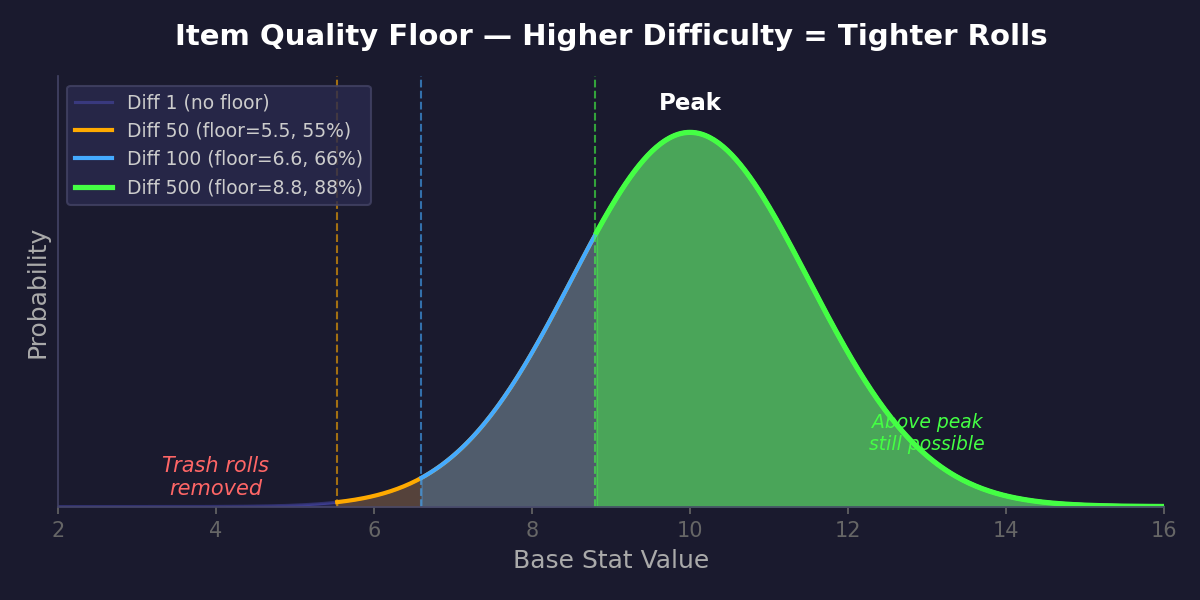
How base stats work (nerdy details)
Every item has a tier (1–10) that determines its base stat potential. Higher difficulty drops higher tiers. The base stat is rolled from a bell curve centered on the tier value, then multiplied by a rarity factor (Normal 0.4x, Common 0.6x, Rare 0.7x, Exquisite 0.8x, Epic 0.9x, Ancient 1.0x).
The quality floor clamps the bell curve roll so it can't go below a % of the tier peak. This happens before the rarity multiplier.
Example — Broken Dagger (Tier 1), Epic, at Lv.100:
- Bell curve centered on 1, so raw rolls range roughly 0.5–4
- Quality floor at diff 100: 1 × 66% = 0.66 → cuts the very worst rolls
- Epic rarity multiplier: raw roll × 0.9 → final base damage around 0.6–3.6
- Tooltip shows: Damage × (10 + item_level) = base × 110 → 66–396
Example — Dark Lord's Blade (Tier 10), Epic, at Lv.100:
- Bell curve centered on 10, so raw rolls range roughly 5–16
- Quality floor at diff 100: 10 × 66% = 6.6 → eliminates sub-7 rolls
- Epic rarity multiplier: raw roll × 0.9 → final base damage around 5.9–14.2
- Tooltip shows: Damage × (10 + item_level) = base × 110 → 649–1,562
tl;dr — higher difficulty = same ceiling, higher floor. You won't get stronger items, but you'll stop getting weak ones.
How item tiers shift with difficulty
Item drops use a sliding bell curve to pick which tier (1–10) you get. As difficulty rises, the peak of that curve shifts to higher tiers:
| Difficulty | Most common tier | Avg tier | Chance of T8+ |
|---|---|---|---|
| 1–25 | T1 | 2.8 | 3.8% |
| 50 | T2 | 3.2 | 4.8% |
| 100 | T3 | 3.8 | 6.6% |
| 500 | T4 | 4.5 | 9.6% |
| 1,000 | T5 | 5.2 | 14.2% |
| 5,000 | T6 | 5.8 | 21.4% |
The curve always has a spread — even at diff 1 you can get lucky with a high-tier drop, and at diff 1000 you'll still see some lower tiers. But the odds shift steadily in your favor.
tl;dr — higher difficulty = more high-tier items, but it's always a bell curve, never guaranteed.
Salvage Overflow
- When salvaging for Gold and you hit the Gold cap, remaining items are automatically converted to Dust instead (and vice versa)
- A second popup shows the overflow amount in the other currency
- No more wasted salvage value when one currency is full
UX
- Last selected area and difficulty are now remembered across sessions
- Favorite items always appear at the top of your backpack
- Fixed loot item tooltips appearing outside the fight log area
- Expired boost backpack items are now properly frozen — visible but locked, won't shift up when you salvage other items
- Item comparison tooltip: equipped item now always shows on the right side (consistent with merchant)
April 2, 2026 — Guest Accounts & Offline Runs
Guest Accounts
- Play without Google Sign-In — create a guest account with just a password
- Auto-login from localStorage, or log in manually with your Guest name + password from any device
- Link a Google account at any time to unlock PvP and additional character slots
- After linking, guest characters can be renamed from the character select screen
- Logout button added to character select and Options menu
Offline Runs
- Runs now continue on the server when you disconnect — close the tab, switch devices, lose connection, your character keeps fighting
- On reconnect you resume right where the server is, with a green "Resumed! X fights completed while away" message
- If your character dies while you're away, you'll see a full run summary on next login (loot is saved)
- Cross-device recovery — if your session moves to a different server, the old run is automatically retreated and your progress is preserved
- 60-second reconnect window before the "Connection Lost" popup appears (was 7 seconds)
March 31, 2026 — Balance Pass & Ancient Rarity
New: Ancient Rarity
- Ancient items — a new rarity tier above Epic
- 5 attributes (Epic has 4)
- Smithing: Epic items can be upgraded to Ancient (requires an Ancient sacrifice item)
- Where do they drop? As if ... :-P
Combat
- Halfed Armor for PVP. Fights wont take up 20-30 rounds anymore
- Enemies now have a slight initiative advantage — higher-difficulty enemies are more likely to strike first
- Elemental resist/weakness increased (30% → 50%) — element matching matters more
- Enemies above difficulty 100 now have baseline armor for empty equipment slots of 1 armor each slot
- This is to combat increasing player advantage. While early game is "fair" between player and enemy (both are naked or have crappy gear), late game shifts heavily in favor of the player, as the player accumulates superb gear, while enemies still are equiped like level 1 enemies.
Items & Economy
- Rarity base stats rebalanced — each tier now has a distinct multiplier
- Before: Normal 0.5x, Common 0.75, Rare 1.0, Exquisite 1.0, Epic 1.0
- Now: Normal 0.4x, Common 0.6, Rare 0.7, Exquisite 0.8, Epic 0.9, Ancient 1.0
- Elemental damage attribute range increased (min 1→2, max 10→15)
- Flat elemental damage slightly buffed aswell
- Flat life on hit slightly reduced
- Be honest, OP attributes on Weapon are Leech% and flat life on hit
- Spoiler: they still are
- Reflect attributes now drop matching the area's offensive element (useful for another area)
- Merchant stock adjusted — items closer to player level (mostly floor raised)
March 30, 2026 — Minor Glitches & Community
Stability
- Fixed a bug where fight log entries (enemy defeated, loot) could appear multiple times after tab switching
- Improved connection handling — reconnect logic now properly cleans up stale state, preventing ghost event processing
- This was a consequence of the stability improvements earlier today.
Community
- Discord server — discord.gg/eQC68Rv. Chat, theorize, share loot, and give feedback
March 30, 2026 — Stability & Android
Huge thanks to all day-1 launch users for the feedback and patience while we ironed out the rough edges. This patch addresses the most-reported issues.
Android
- Background mode — toggle "BG" during a run to minimize the app. Keeps the app alive so fights replay instantly when you return
- Screen stays awake during runs and duels (no more screen timeout mid-fight)
- Hardware back button now navigates between scenes (+ Exit Game in Options)
Stability
- 7-second reconnect grace period — brief connection hiccups no longer kick you out
- Reconnecting overlay is now a proper centered popup instead of tiny top-bar text
- Server graceful shutdown retreats all active runs (no more lost loot during deploys)
Fixes
- Difficulty cap: max difficulty limited to 5x your level (friendly popup if you try higher)
- Run summary now correctly shows enemies killed (was showing fights spawned)
- Force Retreat button restored when returning to an active run
- Prospector skill display fixed in backpack (was still showing old "Scavenger" name)
UX
- Smithing upgrade shows a proper popup when no valid sacrifice item exists
- "Skip All" button in boss soul animations now appears next to "Continue"
- Error messages across all scenes now use red text instead of blending into the background
March 29, 2026 — Balance Update + Server Wipe
Server wipe: all characters reset to level 1 (names kept). The XP curve, skill changes, and area unlock rebalance made a fresh start necessary to ensure a level playing field. This is in preparation for making the game public to a broader audience. If the new XP curve turns out to be too slow, we can always make it faster — but slowing it down after players have progressed is not an option.
- XP curve steepened (exponent 2.0 → 2.2) — higher levels take progressively longer
- Area unlock levels rebalanced:
- Canalization: 7 → 10
- Catacombs: 13 → 30
- Volcanic Caves: 23 → 50
- Ice Mountains: 37 → 70
- Shadow Realm: 50 → 200
- Dragon's Lair: 70 → 250
- Scavenger (magic find) skill replaced with Prospector (+% salvage dust) — same role as Haggler but for dust
- Monster tier distribution expanded for Shadow Realm and Dragon's Lair accessibility
- Tier7 (difficulty 501-999) expanded: all Tier6 monsters now also appear in Tier7
- Max 500 fights per run (~3 hours) — run ends automatically with loot kept
- Website Hall of Fame at /leaderboard — PvE and PvP rankings, 100 per page
- Alpha Tester exclusive skin — granted to all accounts that played before the public launch. Account-wide, available on all characters
March 27, 2026 — Launch
- Epic Idle Quest 2 launched at epicidlequest2.com
- 8 areas with elemental combat cycles and infinite difficulty scaling
- Crafting & smithing: reforge, temper, upgrade, attune, enhance
- PvP brawl with ELO-rated matchmaking
- 900+ monster skins to collect
- 12 skills across 4 categories
- 37 unlockable music tracks
- Multi-character support (up to 3 per realm)
- Android closed test submitted to Play Store